How to tell if a candidate used AI
Oct 17, 2026 · 6 min read
 The Gradient TeamGradient
TL;DR: Wondering whether a candidate ran your take-home through ChatGPT? AI detectors are an unreliable solution, and people increasingly know to hide obvious AI tells. Instead, look for signs of real understanding and effort, and design both the take-home and the follow-up interview to show you that.
At Gradient, we often hear a version of this from hiring teams: a take-home assignment or case study came back polished, but the candidate struggled to explain it in the follow-up interview. This wastes the team's time, and means it's harder than ever to identify strong candidates.
AI compresses the distribution
The reality is that, for interviews and take-home assignments, AI use tends to compress the median. While historically candidates might have produced a wide range of work outcomes, now most candidates can do a solid job on any take-home.
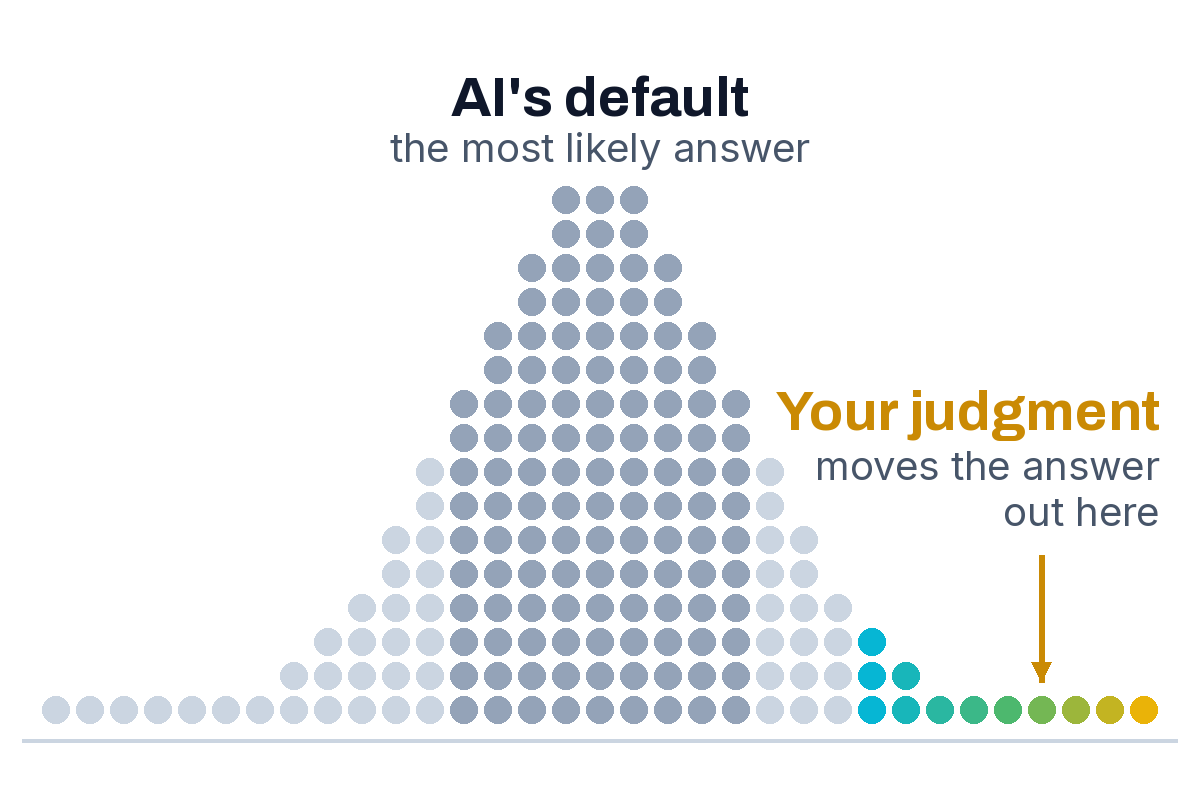
Teams, then, need to understand the answer to this question: which candidates applied their unique judgment to create above average outcomes, and catch things other candidates missed?
This question is much more important, but much more difficult to assess, than just understanding whether or not a candidate used AI: this requires understanding how they used it.
Why AI detectors don't work for hiring
One common approach is to ask candidates to not use AI at all, and then use a tool like Pangram or GPTZero to check the work for signs of AI use.
Here's the challenge: Detection tools score text on how predictable it is, and plain, careful writing is predictable too. In a Stanford study, seven detectors flagged more than half of essays by non-native English speakers as AI-generated (Liang et al., 2023). OpenAI retired its own classifier in 2023 for low accuracy: it caught 26% of AI-written text and flagged 9% of human writing as AI (OpenAI). If your assessment is a spreadsheet or a slide deck, the outputs are even less reliable. This makes no-AI policies extremely difficult to enforce.
Banning AI entirely also often doesn't reflect how you expect candidates to work on the job. We wrote more about this in What to do when AI can solve your take-home. If you want to know how they'll perform in the role, why not give them access to the tools that you want and expect them to use every day?
Signs a candidate relied on AI without checking i
When we review assessment sessions, these are the patterns we see most often from candidates who accepted AI output without checking it:
- Misunderstanding key metrics. AI tools love definitive statistics and metrics, but will also repeat them as stated without investigating how the number was calculated and if the source was reputable. When metrics are ambiguous (as they often are in real company settings!), AI will often be confidently wrong and use numbers that don't reflect the real root cause.
- Numbers the candidate can't trace. AI sometimes invents plausible numbers, and a candidate who didn't check won't know which ones. For example, AI loves to make up word count numbers: if you don't make the AI tool verify the exact number, it will often guess (wrong).
- A missed caveat. AI summaries of long documents often leave out footnotes and exceptions. Experienced professionals often look for these first, since they contain critical information. If the recommendation ignores an exception stated on page 6 of the source, the candidate probably worked from a summary.
- A vague reflection. Ask what they'd do differently next time. "I'd iterate more on the prompts" could describe anyone. A candidate who took the time to think through the problem and struggle tends to have concrete ideas for the future.
At Gradient, when we work with teams to design assessments, we consider what AI is great at, and where it struggles, and use that knowledge to design assessments where individuals who use AI thoughtfully, and with good judgment, spot these types of errors and produce differentiated results.
How to design a take-home that differentiates, even with AI use
We love working with teams to craft the right take-home for your company. But, we know that some people like to do this themselves. If you're creating a take-home that you want to be AI-proof, here are a few suggestions:
Run the brief through AI firs
Paste the brief and every attachment into Claude or ChatGPT, ask it to complete the task, and read the result. If that answer would pass your review, the deliverable alone can't separate candidates, and you need to change the task. This is part of how we design our own assessments.
Include a decision AI can't make for the candidate
AI finds most errors planted in the documents, because it reads every file you attach. For example, if an older report says one thing and a newer one corrects it, the model spots the conflict on its own.
AI struggles more with a decision that has two reasonable answers, where the right call depends on priorities the brief leaves to the candidate. Score how well the candidate justifies the choice, and ask about it in the follow-up. Numbers where the definition matters (net or gross, monthly or quarterly) also work, because AI takes the label at face value.
Ask follow-up questions that change an assumption
"Walk me through your analysis" lets a candidate repeat what's already in the deliverable. Instead, change one input and ask how the recommendation changes, for example if churn were 8% instead of 5%. These questions are hard to answer well without understanding how the analysis was built.
Allow AI, and ask candidates to show their process
Another tactic is to allow AI use, but require candidates to share their prompts, or the chat where they worked on the assessment. This makes it easier to understand the thought process and see how candidates will use AI in work settings.
If you do decide to allow AI, make sure every candidate has access to the same tools, or the scores partly reflect who pays for a better subscription.
What Gradient does
Gradient runs the take-home in a standardized environment: every candidate gets the same model and tools, and every assessment includes problems for the candidate to catch or decide. Your reviewers get the deliverable plus the session behind it: every prompt, file opened, edit and correction. We score AI fluency on four dimensions, Setup, Direction, Judgment and Mindset, from what the candidate did in that session.
If you're trying to work out whether your take-home still tells you anything, book a demo and we'll show you what a scored session looks like.
Start hiring AI fluent talent.
We’ll show you an assessment, walk through the scoring engine, and get you live in a few hours.
More from the blog
What to Do When AI Can Solve Your Take-Home
AI-written take-homes all look credible, then fall apart in the live review. How teams are reading the session and the prompts, not just the deliverable.
 MB Samuel
Sep 14, 2026 · 5 min read
Not Every Candidate Has the Same AI
If your take-home allows AI, you're also testing who can afford a subscription. Why that's a fairness problem, and the three ways teams handle it.
MB SamuelSep 14, 2026 · 3 min read
Build or Buy an AI Skills Assessment
Build your own AI skills assessment at low volume or while you're experimenting. Buy when you need scores you can defend at scale. How to decide.
MB SamuelSep 14, 2026 · 5 min read