Build a Brand Skill That Actually Works
Sep 15, 2026 · 15 min read
 MB SamuelFounder
TL;DR: Tired of asking AI for a deck and getting black-and-purple slides that look nothing like your company? Package your colors, fonts, logos, and voice into a brand skill once, and every deck, doc, and email after that comes out on-brand.
When we run trainings at Gradient, we often work with teams to set up a /brand skill: AI-readable instructions for how to make brand-guidelines-aligned documents.
This unlocks a magical moment: instead of asking AI for a PowerPoint deck and getting black and purple graphics with em-dashes and tiny font, you ask for a deck and get slides that look like the ones your team makes every day.
Here's a real example. The left side uses Claude defaults; the right side uses our /gradient-brand skill:
Same prompt, same model
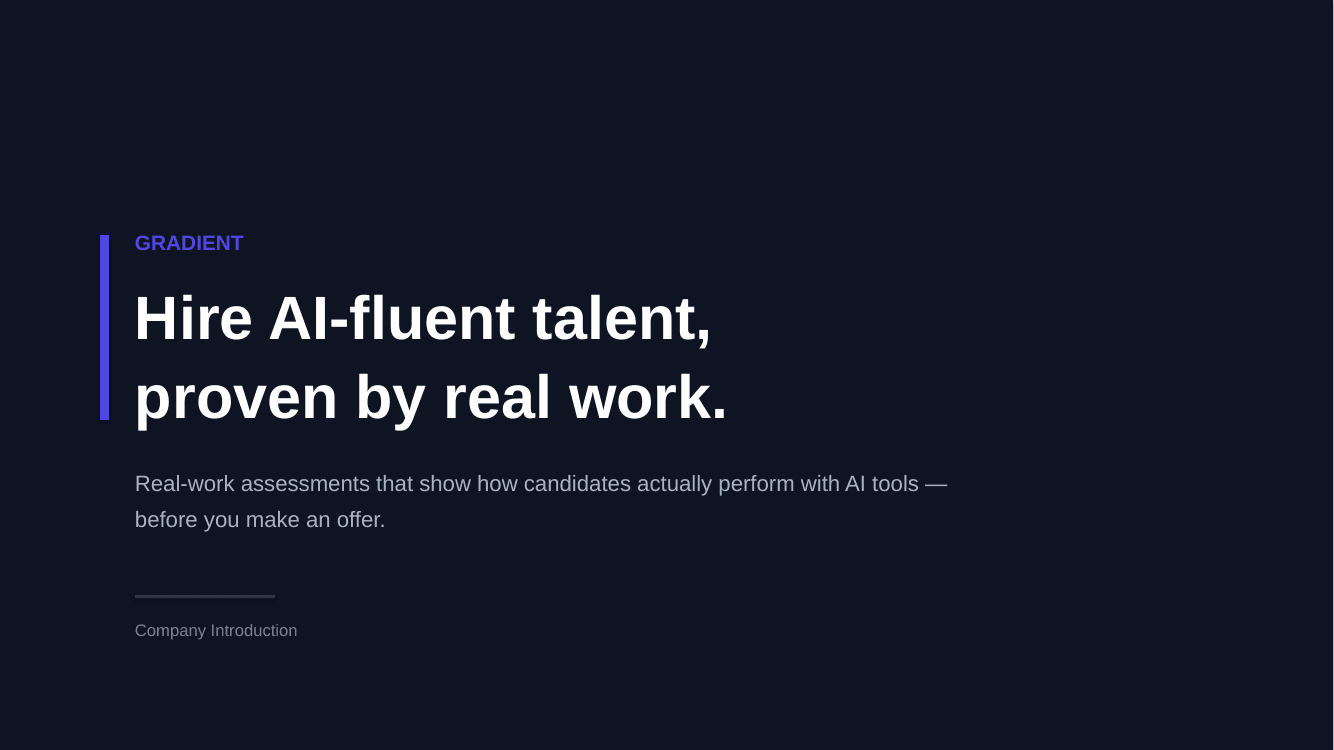
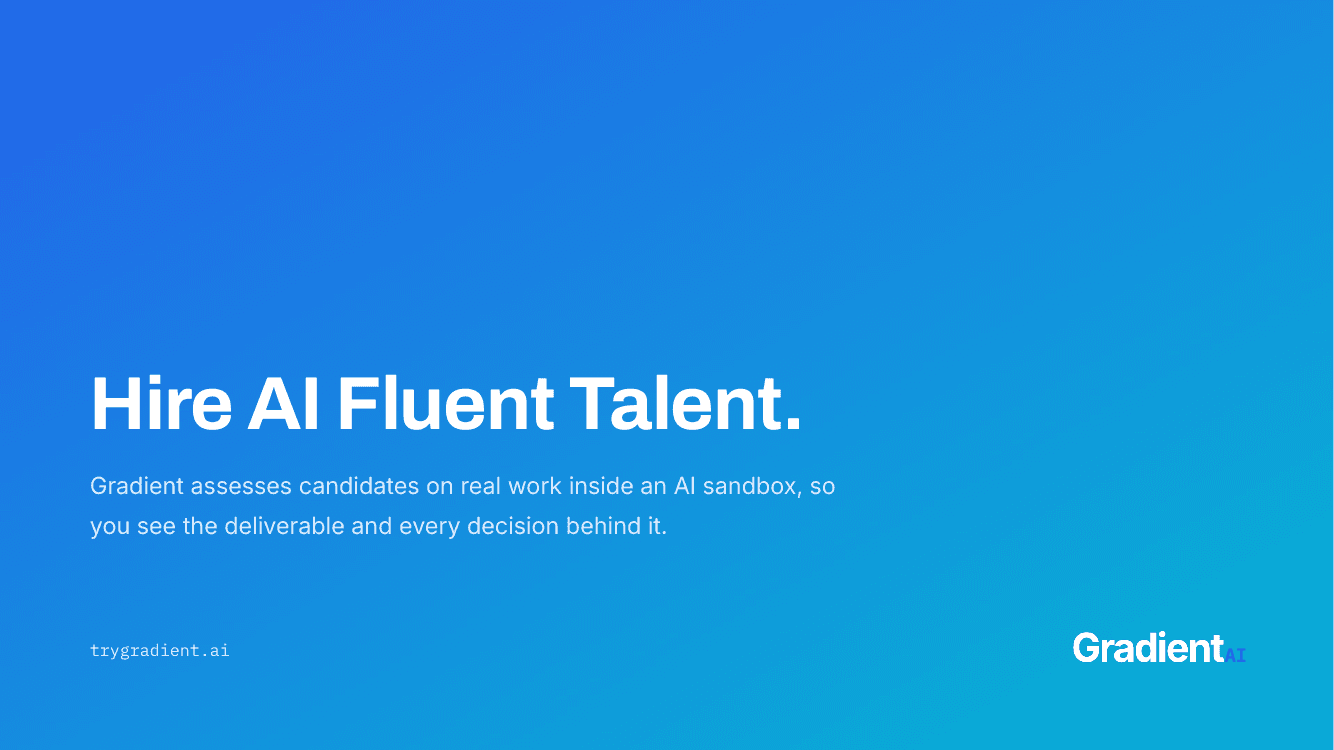
Prompt: "Make me a short 2-slide PowerPoint deck introducing Gradient, a company that helps companies hire AI-fluent talent through real-work assessments. Slide 1: a title slide. Slide 2: why it matters, with a few stats (you can invent placeholder stats)."
There is surprisingly little guidance on the internet around how to build a /brand skill for your team, so we decided to write the post we wished we'd had, five versions of /gradient-brand and countless client brand skills ago.
First, a quick definition: what's a skill?
A skill is a reusable instruction that teaches your AI how to do something.
Once you create a skill inside your AI tool, the model can find and load it on demand. For example, if I ask Claude to "build a Gradient slide," Claude will read through our brand guidelines via the /gradient-brand skill automatically, no pasting required.
If you want to specify a skill explicitly, typing a forward slash lets you search through and select an available skill by name.
The anatomy of a skill
A skill has a few parts:
- A name. Ours is
/gradient-brand. Names should be simple and explicit. - A description that tells the AI when to use it. Ours, verbatim: "Gradient AI's brand system - color, type, logos, voice, and the deck template. Use when creating or reviewing Gradient-branded artifacts such as decks, PDFs, pages, emails, or copy."
- Files and assets: Instructions, templates, scripts, logo files, and so on.
Skill instructions are stored in a format called Markdown (.md): plain text with a little structure, readable by you and the AI alike. The main one, SKILL.md, includes the skill's name and description, and can act as a 'table of contents': pointing the AI to other files in the folder depending on the task. Skills are typically packaged as zip or .skill files for sharing, so everything travels together.
Here's the full structure of our skill:
SKILL.md
The first file the AI reads, every time. Our colors as hex codes, fonts, logo rules, voice in five lines, the never-do list, and a pointer in each section to the reference file for that surface:
Copy, tone, emailsreferences/voice.md
Slide decksreferences/slides.md
Branded PDFsreferences/pdf.md
This is a lot of files! You can imagine that it might be overwhelming, or at the very least expensive, for the AI to read all of them.
Fortunately, it doesn't have to, thanks to a principle called progressive disclosure:
You say: "build a Gradient-branded slide." At this point, all the AI can see of any skill is its name and description.
- /gradient-brandGradient AI's brand system - color, type, logos, voice, and the deck template. Use when creating or reviewing Gradient-branded artifacts such as decks, PDFs, pages, emails, or copy.
- /codebase-designArchitecture conventions for our product repos. Use when writing or reviewing code.
- /image-to-videoTurns a static image into a short animated clip. Use for social teasers.
- /draft-email-in-mb-voiceDrafts emails in MB Samuel's voice. Use when composing or replying to email on MB's behalf.
Now let's go through each part of our /gradient-brand skill and talk through best practices.
Name and description: What AI sees every time
Because of progressive disclosure, the AI tool uses only the skill's name and description to decide if the contents are useful to the task at hand.
Descriptions should be succinct, but should very clearly define what's inside, and when to use it. Ours is, "Gradient AI's brand system - color, type, logos, voice, and the deck template. Use when creating or reviewing Gradient-branded artifacts such as decks, PDFs, pages, emails, or copy." Yours could end with "Use whenever making customer-facing documents at Acme."
If your description is too long, it will get truncated and AI won't see the whole thing. If it's too short, or vague (like "Our brand guidelines"), AI is less likely to think it's relevant. In both of these failure modes, the skill sits unused while decks come out purple. One to two sentences and explicit guidance on when to use the skill, directed towards the AI reader, strikes the right balance.
SKILL.md: The table of contents
When the AI tool decides to use a skill, it always reads the SKILL.md file first. This file is where you should put your most important principles, ones you want AI to read every time your brand is discussed, and your 'table of contents': pointers to other files and resources that are relevant sometimes, but not all the time.
In general, you should try to keep skills as short as possible: fewer instructions means fewer tokens - so less cost - and helps the AI stay focused on the things that are most important.
With this in mind, the SKILL.md for /gradient-brand includes only a few things:
-
Brand colors, as hex codes. Hex codes for your top ~5 brand colors. These should be represented as hex codes (like
#2563EB) so they get represented correctly every time.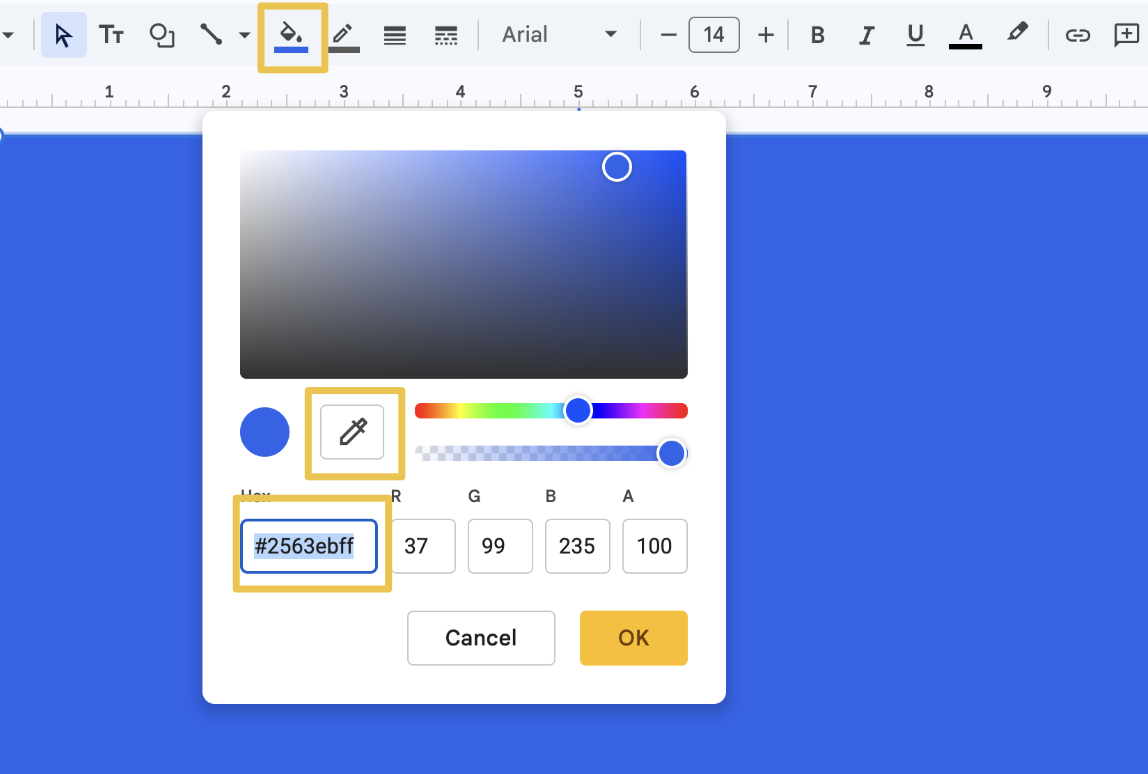
P.S. If you're not familiar with hex codes, the easiest way to see them is in a tool like Google Slides or PowerPoint: pick any color in the fill menu to get its hex code. There are lots of Chrome extensions that do this, too! -
Fonts, with roles. We use Archivo for headlines, Inter for dense text, IBM Plex Mono only as an accent.
-
Logo rules. Where to find official logos and which colorway to use where.
-
Voice, in five lines. For us: Warm, literal, concise, direct, verdict first. And no em dashes, anywhere.
-
A short "never do this" list. Skill-writing guidance usually says to phrase rules positively, but a few concrete AI tells are easiest to ban by name: left-border callout boxes, icon tiles, lightning bolts and sparkles.
-
PowerPoint instructions. How to build decks from our template and generator script (more on this below).
-
Pointers to the reference files, so the AI knows where to go deeper for a specific surface.
Rather than describe it further, here is our full SKILL.md, verbatim:
---
name: gradient-brand
description: Gradient AI's brand system - color, type, logos, voice, and the deck template. Use when creating or reviewing Gradient-branded artifacts such as decks, PDFs, pages, emails, or copy.
---

# Gradient Brand

How Gradient looks and how it sounds. This file has the essentials that apply to almost everything; each section names the reference file to load for depth.

## What Gradient is

Gradient AI helps companies **hire AI-fluent talent** through real-work assessments. Candidates complete take-home projects inside an AI-powered sandbox; hiring managers see the deliverable and the full process: every prompt, edit, and decision. Tagline: **"Hire AI Fluent Talent."** URL: `trygradient.ai`.

## Colors

| Name | Hex | Use for |
|---|---|---|
| Blue (primary) | `#2563EB` | Buttons, links, accents, headline emphasis |
| Cyan | `#06B6D4` | Gradient midpoint, secondary accent |
| Yellow | `#EAB308` | The "AI" in the logo, highlights, warm accents |
| Ink | `#0F172A` | Body text |
| Page | `#FAFAFA` | Page and slide backgrounds |

The signature element (and the company's namesake) is the brand gradient: `linear-gradient(135deg, #2563EB 0%, #06B6D4 50%, #EAB308 100%)` (blue → cyan → yellow). Tint one or two words of a headline with it ("Hire **AI Fluent** Talent") to emphasize the idea, not to decorate the page.

## Fonts

- **Archivo** (400-700): headlines, titles, big numbers, body at 16px and up.
- **Inter** (400-700): dense text at 14px and below, and the logo wordmark.
- **IBM Plex Mono**: code and the logo's "AI" subscript. An accent, never body text.

## Logo

The gradient triangle-hill with a sun orb, plus the "Gradient" wordmark and a blue "AI" subscript. **Always use the files in `assets/logos/`** (light and dark, PNG and SVG). Never redraw the mark or re-set the wordmark in another font. The logos are baked from one spec by `assets/generate-logos.mjs`: to change a logo, edit the spec and rerun the script, never a PNG.

## Voice

Warm, polite, literal, clear, concise, direct: verdict first, evidence instead of adjectives, no AI-isms. **No em dashes, anywhere** - use parentheses, commas, a spaced hyphen, or shorter sentences. Load `references/voice.md` before writing copy.

## Never do these (they read as machine-generated)

- Left-border colored callout boxes ("Note:", "Pro tip:")
- Rounded-square colored backgrounds behind icons
- Lightning-bolt or sparkle icons
- Em dashes
- "Excitement," "supercharge," "take work off plates"

## PowerPoint decks

Every deck starts from the bundled template, never from scratch. Duplicate a designed slide and replace its text; fonts, spacing, and footer chrome come along for free.

- **Template:** `assets/gradient-template.pptx` - eight designed slides.
- **Generator (preferred):** `scripts/gradient_pptx.py` duplicates template slides and fills in your text. Needs only `python-pptx`:

```python
import sys; sys.path.insert(0, "scripts")   # path to this skill's scripts/
from gradient_pptx import Deck

d = Deck()
d.cover("We help teams hire AI-fluent talent.", "trygradient.ai")
d.stats("Why it matters", "AI fluency is a hiring signal.",
        [("Adoption", "81%", "of knowledge workers use AI weekly.")] * 3)
d.process("How it works", "One exercise, four steps.",
          ["Explore", "Build", "Reflect", "Submit"])
d.save("deck.pptx")
```

- **By hand:** open the template with your environment's pptx skill, duplicate the slide that fits, replace text, delete unused slides.
- `scripts/example.py` builds a demo deck using every slide type; run it to see.
- Slide-by-slide guidance and the shipping checklist: `references/slides.md`.

## Branded PDFs

Render PDFs from HTML with the brand fonts and palette, and always look at the output before sending. Recipe: `references/pdf.md`.

## Bundled assets

- `assets/logos/` - mark, wordmark, and lockup; light and dark; SVG and PNG at 1x/2x.
- `assets/gradient-template.pptx` - the deck template the generator draws from.
- `assets/backgrounds/` - light atmosphere surfaces for slides and pages.
- `assets/colors.json` - the palette above as data.
Our brand skill includes a lot more detail, but the rest is split into reference files per surface: voice.md for copy, slides.md for decks, pdf.md for documents. Yours could add social.md or email.md. The most important thing is that we include the essentials up front, and tell AI where to go to learn more for a specific ask.
Assets: Include the real files!
As we mentioned above, skills are like folders. They include instructions, but they can also include other resources like images and powerpoints.
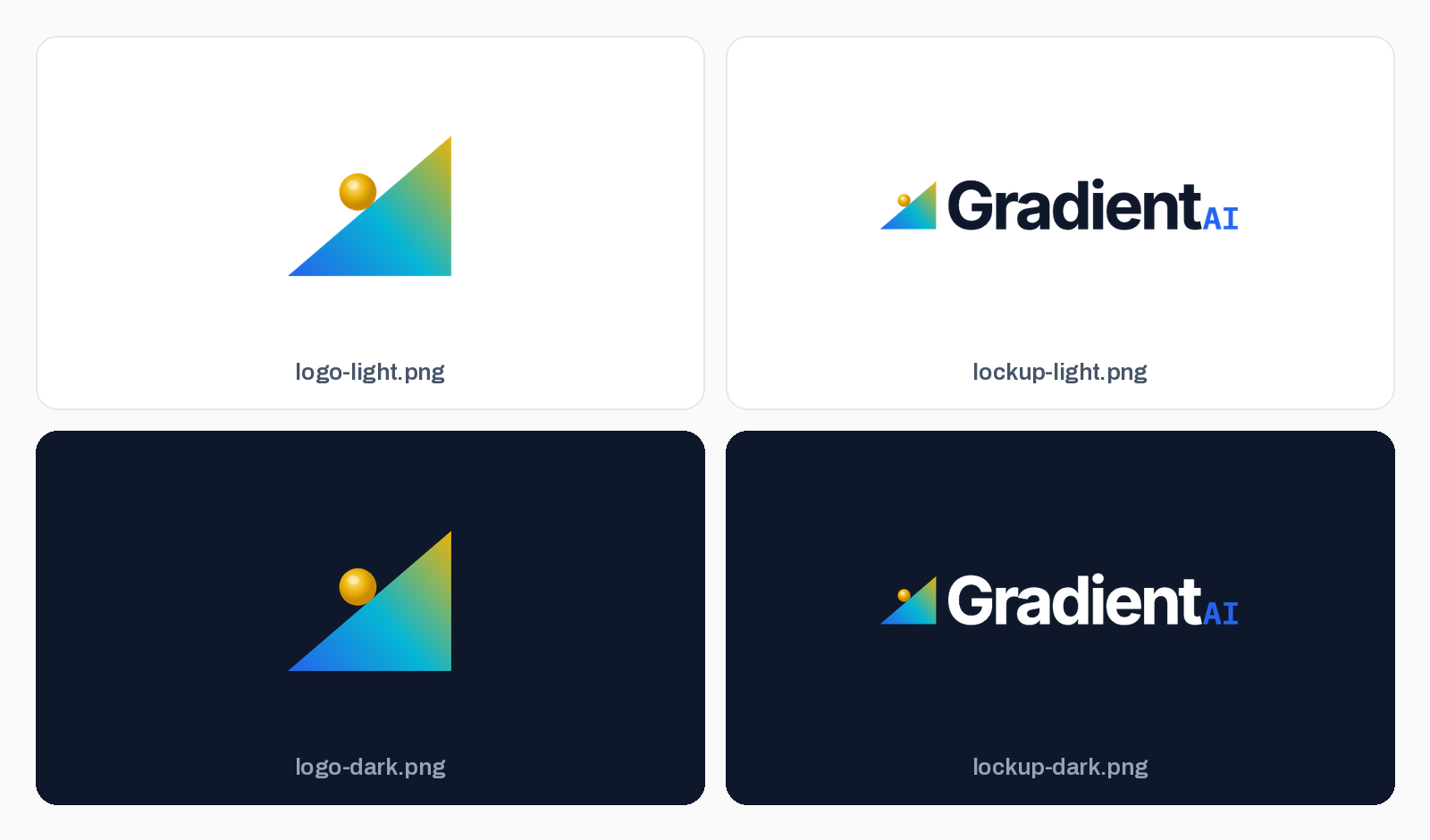
Your logo should never be approximated. Put the real files in the skill, in every variant you use, and the AI places your actual logo instead of drawing something logo-shaped:
Hosted logo URLs can also work, but only if you feel very confident the logo won't move or shift. The trade-off depends on the surface. For web pages and emails, a URL can even be better: the page references the image directly and stays light. For PowerPoints and PDFs, the image has to be embedded in the file itself, so the AI must download your logo first, which fails if the URL is behind a login or has moved. Files that live inside the skill work everywhere.
One pitfall, from real skills we've fixed, is to include a path that only works on one laptop. References like /Users/dana/Desktop/logo.png break the moment the skill is shared. Everything the skill needs should live inside its folder.
Scripts: Include your pptx template, but don't make the AI read it every time
AI typically makes documents like PowerPoints or PDFs by writing code, specifically Python. These pieces of Python code that generate finished documents are often called 'scripts.'
This is not intuitive for PowerPoint power users or for marketing teams, but it works really well: AI is much better at writing code than at dragging shapes around a slide.
Your PowerPoint template belongs in the skill too. But a .pptx is a big, dense file, and reading it raw on every request - and writing code to replicate it anew each time - is slow and expensive. The related pitfall is describing the template in prose instead ("our decks use a cream background with..."). This rarely gets consistent results.
The fix for both is to ship the template plus a small script. Ours is scripts/gradient_pptx.py: it duplicates our brand-aligned slides from the template and replaces only the text, so fonts, spacing, and the footer logo carry over untouched. The AI calls the script instead of parsing the template:
The AI writes this
d = Deck()
d.stats("Why it matters", "AI fluency is now a hiring signal.",
        [("Adoption", "81%", "of knowledge workers..."),
         ("Ramp speed", "2x", "faster time-to-productivity..."),
         ("Blind spot", "0", "questions about AI...")],
        takeaway="Interviews were built for a world before AI...")
d.save("deck.pptx")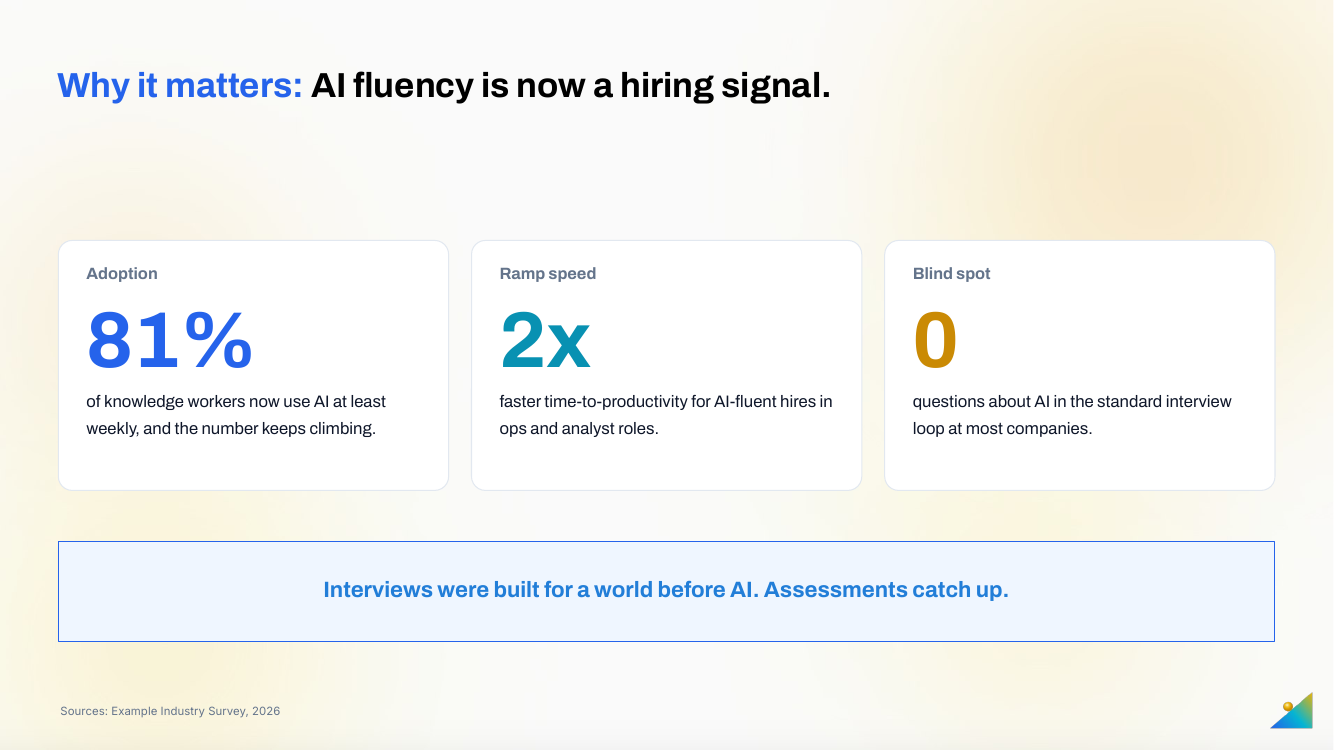
A script also locks in best practices: AI tools often float text boxes on top of shapes instead of putting text inside the shape itself, which falls apart as soon as someone edits the slide. A script that fills the template's real placeholders can't make that mistake.
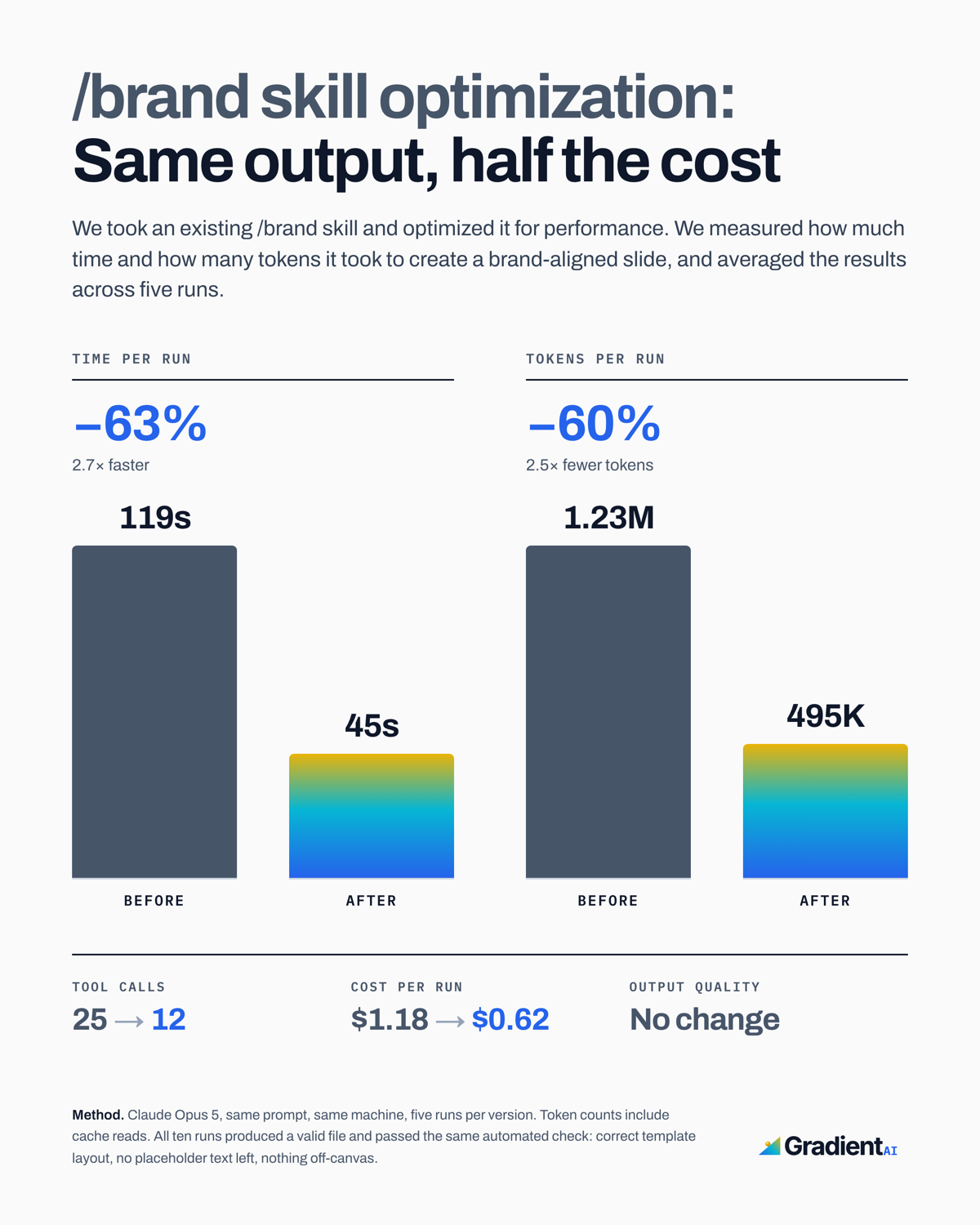
We measured the difference on a customer's /brand skill, before and after adding a script like this:
The critical last step: testing
A brand skill is never right on the first draft. First, test yourself with a simple 'eval' or evaluation loop:
- Pick two or three real tasks you'd want this skill to help with: a deck from a brief, a customer email, a one-pager.
- Run each task twice, once with the skill installed and once without, and compare against a short checklist: right fonts? real logo? right colors? sounds like us? no formatting issues?
- Fix the skill where it failed, not the output. If the deck came back in the wrong font, the skill needs a clearer rule, and the next hundred decks get the fix for free.
Then repeat. Every version of /gradient-brand came from a loop like this.
How to make your own brand skill
You don't have to write any of this yourself. Most AI tools that support skills include a skill creator (Anthropic's is called skill-creator, and Copilot and Cowork have brand-kit flows). Hand your AI four things:
- Your slide template, plus a few finished decks you're proud of.
- Your brand guidelines, in whatever form they exist.
- Your logo files.
- A link to this blog post, so it knows the shape to aim for.
Then have it go from there. A starting prompt like this one helps it build a skill shaped like ours:
Help me build a brand skill for my company, like a standard operating procedure you can use whenever I ask for branded work. I'm attaching real examples of our materials (decks, docs, our logo files, brand guidelines if we have them).

Build it with this structure:
- SKILL.md: a short file with our most important rules, read every time. Include our colors as hex codes, our fonts and their roles, logo rules, our voice in five lines, and a "never do this" list of things that make work look AI-generated. End each section with a pointer to the relevant reference file below.
- references/voice.md: how we sound, with three real before/after examples.
- references/slides.md: our deck conventions, slide by slide.
- assets/: our actual logo files in every variant, and our PowerPoint template. Include the real files, never links to them.
- If you can, a script that builds new slides by duplicating our template's designed slides and replacing only the text.

Keep every file short. Ask me questions where my materials are ambiguous or contradict each other, one at a time, before writing. Then show me SKILL.md first for approval before writing the rest.
You can also download our example if you want to see how a finished one fits together.
Rolling it out to your team
A brand skill only pays off if it lives where your team already works:
- Install it once, centrally. Claude lets organizations share skills as plugins, Copilot takes them in Studio agents, and Cowork installs them for a whole workspace. Don't email the zip around: that's the outdated-template problem all over again.
- Give it an owner. Whoever owns the brand portal owns the skill. When colors, templates, or voice change, they update the skill and re-run the checklist from the testing section.
- Let it grow one surface at a time. Once decks work, your team will ask for emails, one-pagers, and social. Each one is a new reference file, so add them as requests arrive.
Skills can carry much more than brand work, too: our CRM improves itself every night using the same machinery.
If you're working on AI transformation for your team, a brand skill is one of the first things we set up together in our upskilling programs. Book a demo to see how it works with your own brand.
Start hiring AI fluent talent.
We’ll show you an assessment, walk through the scoring engine, and get you live in a few hours.
More from the blog
Gradient as a teaching tool: Lessons from a classroom pilot
This summer we ran Gradient as a pre- and post-test in a three-week graduate course on generative AI. Here is what the numbers, the students, and the instructors taught us about measuring AI fluency.
MB SamuelSep 10, 2026 · 6 min read

The Most Human Part of How We Work With AI
AI is capable of far more than we use it for, and polished outputs all look alike now. What sets people apart is the inputs, the prompts, the context, and the corrections. Here is how we see that process, in hiring and beyond.
MB Samuel Ashwanth Samuel
Aug 9, 2026 · 5 min read

What to Do When AI Can Solve Your Take-Home
AI-written take-homes all look credible, then fall apart in the live review. How teams are reading the session and the prompts, not just the deliverable.
MB SamuelSep 14, 2026 · 5 min read